Create a webhook
Webhooks allow you to send notifications of Delivery Gateway events to a third-party service. For example, you can set up a webhook to send an event notification when a shipment is created or when a customer updates their address.
Our webhooks send a JSON payload, the content of which depends on the triggering event. One webhook is one event: create a webhook for each of the events you need to send notifications about.
Create a webhook
- Log in to the Delivery Gateway admin dashboard.
- From Integrations, select Webhooks.
- Click New webhook.
- From the Webhook dropdown menu, select the event that should trigger the webhook.
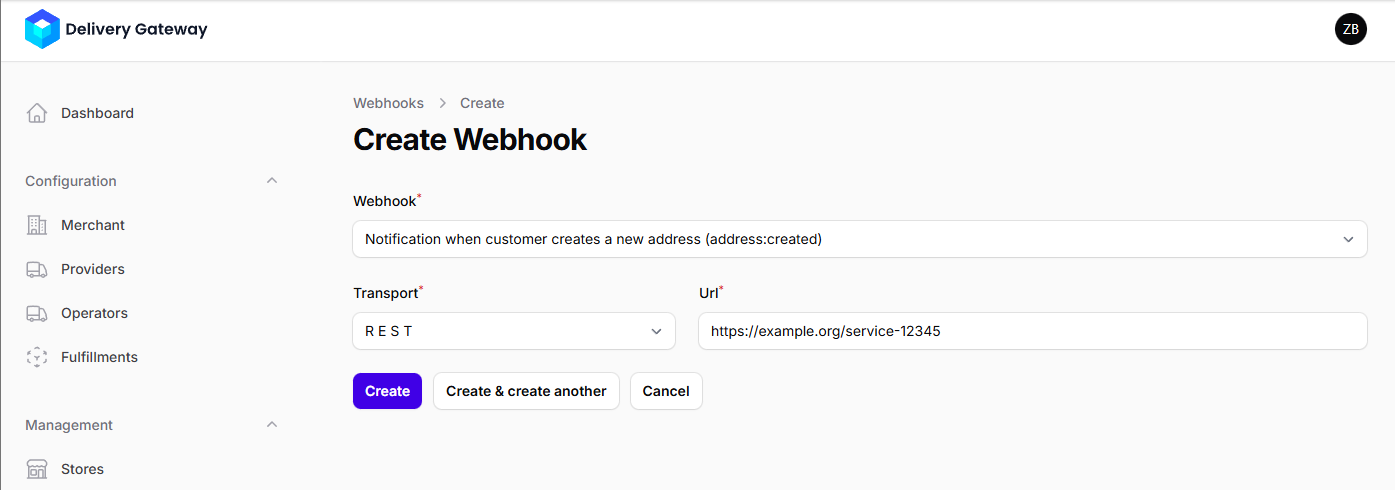
- From Transport, select REST.
- Enter the service URL in the URL field.
- Click Create.
Webhook events
| Event | Event ID |
|---|---|
| Notification when a configuration changes | CONFIGURATION_UPDATED |
| Notification when customer creates a new address | ADDRESS_CREATED |
| Notification when customer updates an existing address | ADDRESS_UPDATED |
| Notification when customer deletes an existing address | ADDRESS_DELETED |
| Notification when a shipment is created | SHIPMENT_CREATED |
| Notification when a shipment is updated | SHIPMENT_UPDATED |
| Notification when a shipment is deleted | SHIPMENT_DELETED |